Troubleshooting
The connection badge says Offline or Connecting
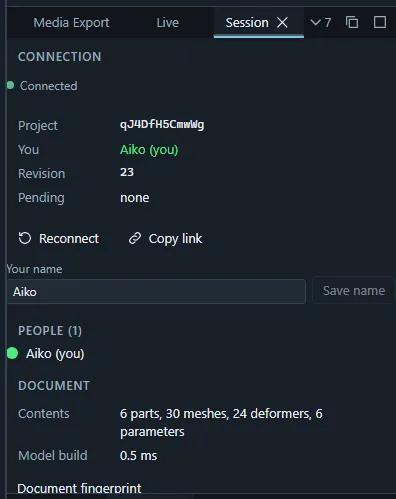
- The project lives in a room on the server; the editor reconnects on its own. The Session panel shows why the connection dropped and how many of your changes are still awaiting the room. Reconnect closes and reopens the connection.
- Changes stay pending until the room confirms them. Before closing the tab after working offline, wait until Pending says none.
- If two people’s views ever seem to disagree, compare Document fingerprint in the Session panel: once everything is confirmed, everyone gets the same value.
Browser requirements
- Ikimotion Studio needs a current Chrome, Edge, Firefox or Safari (16.4 or newer) with WebGL 2. WebGPU is used only when you choose it as the renderer and the browser supports it.
- The site is served cross-origin isolated so the engine can share memory with the renderer. If
a proxy strips the
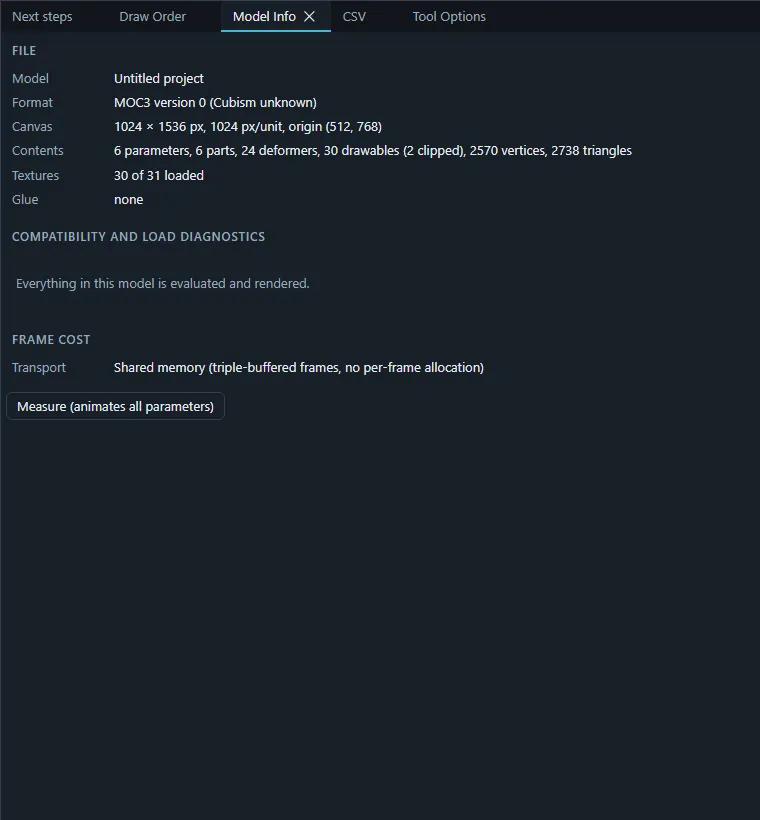
Cross-Origin-Opener-Policy/Cross-Origin-Embedder-Policyheaders, the editor still works but copies every frame instead; Model Info shows the frame Transport and why. - Video export needs WebCodecs encoders; the Media Export panel marks the formats this browser cannot produce. See Media export › Browser support.
- Connecting to VTube Studio or a local Live API server from an
httpspage is blocked by Safari. See Connecting to local apps. - Settings, layouts and recent projects are kept in the browser’s local storage. In private windows or with storage blocked they last only for the session.
An import reports problems
- The report after an import (also kept in the Session and Log panels) lists everything the project could not represent or had to change.
- Model Info › Compatibility and load diagnostics lists features of a loaded model and whether they are evaluated and rendered.
- A
.cmo3or.can3is imported into a project: open or create a project first. A.can3needs the.cmo3it animates (picked together, or already imported) and its linked files. - PSD files with very large documents are rejected with a message; reduce the canvas or split the file.
An edit does nothing or is refused
- Between keyforms: edits need a keyform at the current parameter values, create one or snap to the nearest (see Where edits go: keyforms).
- The default keyform is locked: a banner in the viewport says so; click it to unlock.
- Locked objects: the object, its part or its kind on the canvas is locked (Outliner, Deformers panel, viewport toolbar).
- Someone else is editing it: a mesh in mesh edit is locked for others; the Session panel’s Being edited list shows who.
- Edit keyforms together is active: your edit moves several keyforms (stop it from the banner).
Keyboard shortcuts do not react
- Keys typed into a text field stay in the field; click the viewport first.
- Check the binding in Help › Customize keyboard shortcuts…, each shortcut set (Preferences › Keyboard) has its own keys, and conflicts are highlighted there. The shortcuts reference shows what is in effect now.
The layout is broken
Use Layout › Undo layout change (Ctrl+Alt+Z) right after the accident, reset the workspace, or restore the built-in initial layout. Panels that fold away on tablets and phones open again from their tab at the window’s edge.
The editor is slow
- View › Render resolution draws the model from reduced textures (1/2 … 1/8), exports are not affected.
- Measure frame cost (command palette) and the viewport’s Frame timings show where the time goes; Model Info lists the model’s size.
- Close panels you do not need: hidden panels stop updating.
- Physics and random pose run continuously; turn them off while you edit heavy models.
The exported model looks different in an app
- Check the Target version of the export: features newer than the app’s Cubism version are removed or neutralised and listed under Not supported by the target version.
- Hidden or sketch parts are left out unless included in the Export panel.
- Test the package in the Preview, which plays it the way an app does.